Contact sales

Our software caters to all the verticles of equipment rental businesses. Have other plans? Share yours.

Chat with us

Contact sales

Our software caters to all the verticles of equipment rental businesses. Have other plans? Share yours.

Chat with us
RentInnoLogo
Website Builder

Build your rental store without writing a single line of code

Most rental business lose customers because they have no online store. With RentInno, your store is live before your next customer searches for you - no developers, no third-party tools, no technical skills needed.

RentInno website builder dashboard

Every part of your rental store - built and published without the technical complexity

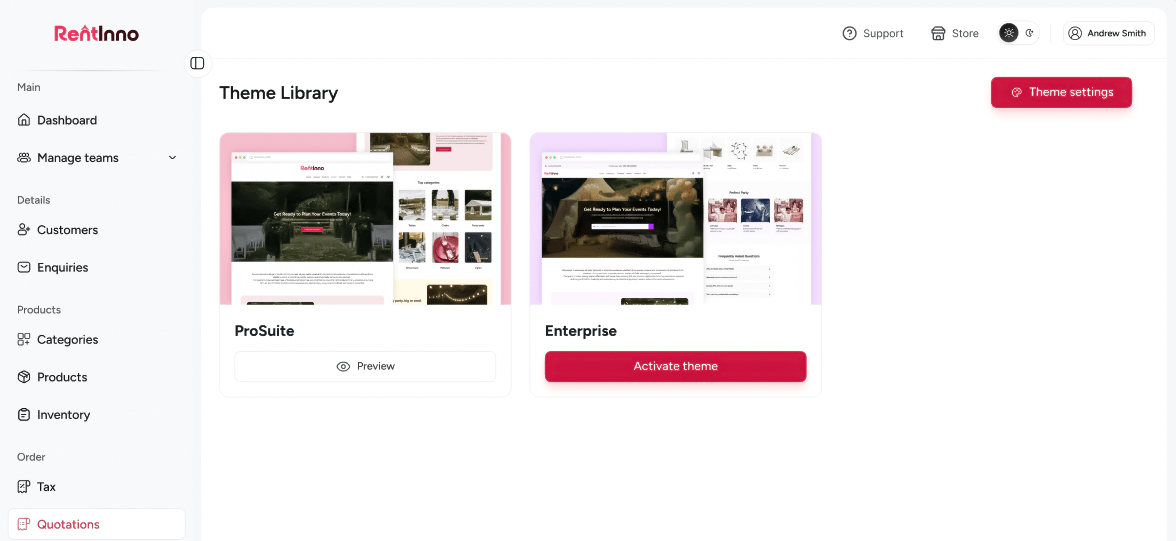
Choose your store theme from the Theme Library

Your store's first impression matters. Browse themes from the Theme Library, preview how your store looks before committing, and switch anytime without losing a single section or page you have built.


Choose your store theme from the Theme Library

Customise colors, fonts, and buttons in Theme Settings

Your store should look like your business - not a generic template. In Theme Settings, set your colors, choose your font, adjust button styles, and switch between Light and Dark mode. Every change applies across your entire store instantly.

Customise colors, fonts, and buttons in Theme Settings

Everything your rental store needs - no developer required

Building a store used to mean hiring a developer. With RentInno, you click Add Section, choose the type of content you want, and your store grows one block at a time. Add as many sections as you need and drag to reorder them anytime - no code, no designer, no waiting.

Everything your rental store needs - no developer required

Control your header and footer from one place

Your header and footer are what customers see on every page. Upload your logo, set Menu Items Order, enable an announcement bar for promotions, and add your contact details - all from Header Settings and Footer Settings without touching a single line of code.

Control your header and footer from one place

Create and manage your store pages

One store can have multiple pages - a home page, an about page, a help page. Create each one from the Pages section, set any page as the Main Page, and each gets its own URL and its own set of sections. No developer needed.

Create and manage your store pages

Your store is ready - here is what happens when customers visit

Product Catalog

Your store displays the products and categories you set up in your product catalog. Every product your customer sees on your store comes from here.

See how the Product catalog works
Quotations

When a customer selects a product on your store and submits a request, it arrives as a quotation in your dashboard. Build and send the quote back in minutes.

Inventory Tracking

Every product on your store is connected to inventory. Stock availability updates automatically with every confirmed booking - no manual changes needed.

Product Catalog

Your customers are looking - is your store ready for them?

Set up your Theme, add your Sections, and publish your rental store directly from your RentInno dashboard - free to start, no installation, no credit card needed.

Frequently asked questions 

What is the Website Builder in RentInno?
If your rental business has no online presence, customers cannot find you. The Website Builder lets you build and publish a professional rental store directly from your RentInno dashboard - no coding, no designers, no third-party website tools.
No. You do not need to know what HTML or CSS is. Everything from choosing a theme to publishing your store is done through your RentInno dashboard. If you can click a button, you can build a store.
Your store goes live at your store URL the moment you click Publish. Customers can browse your products, view pricing, and submit quote requests - without calling you.
Yes. Click Unpublish and your store goes offline instantly - your sections, pages, and content stay exactly as they are. Click Publish again when you are ready and everything comes back.
What themes are available in RentInno?
The Theme Library includes multiple professionally designed themes. Preview each one before activating and switch themes anytime without losing your content.
Yes. In Theme Settings you can set your Primary Color, Secondary Color, Accent Color, Background Color, Text Color, and Subtext Color. You can also set your font, font scale, line height, and button styles.
Yes. Theme Settings includes a Light and Dark mode toggle. Set your preferred mode and it applies across your entire store.
Activating a new theme resets your current Theme Settings and any custom header, footer, or section styles. Make sure you note your current settings before switching if you want to keep them.
What section types can I add to my store?
RentInno supports ten section types - Text, Hero Section, Split Hero Section, Grid of Cards, FAQ Section, Contact Form, Slider Section, Categories Grid, Products Grid, and Search Section.
Yes. Each section has a drag handle. Use it to reorder sections on your store page anytime from the sections list.
Go to the Pages section, click Create page, give it a name and URL, and start adding sections to it. Each page works independently - its own layout, its own content, its own URL.
Yes. Open the Pages section, find the page you want, and click Set as Main Page. That page becomes the first page customers see when they visit your store.
What can I customise in Header Settings?
In Header Settings, you can upload your logo, set Logo Alignment, enable the Topbar Announcement Bar, set Menu Items Order, enable Categories Dropdown, and add your phone number.
Footer Settings lets you add your copyright text, email, phone number, address, navigation links, social media links, and choose your copyright position.
Yes. Enable the Topbar Announcement Bar in Header Settings, type your message, and it appears at the top of every page on your store. Use it for promotions, seasonal offers, or important notices - one setting, every page.
Yes. Footer Settings supports social media links, including Facebook, Instagram, Twitter, LinkedIn, YouTube, TikTok, Pinterest, WhatsApp, Snapchat, Telegram, Reddit, and Medium.
Contact us through whatsapp