
Contact sales

Our software caters to all the verticles of equipment rental businesses. Have other plans? Share yours.

Chat with us

Contact sales

Our software caters to all the verticles of equipment rental businesses. Have other plans? Share yours.

Chat with us
RentInnoLogo
Rental contract

Rental contract management for rental business

Stop chasing signed agreements over email. Each rental contract - sent, signed, and verified - is managed from the same place as your orders.

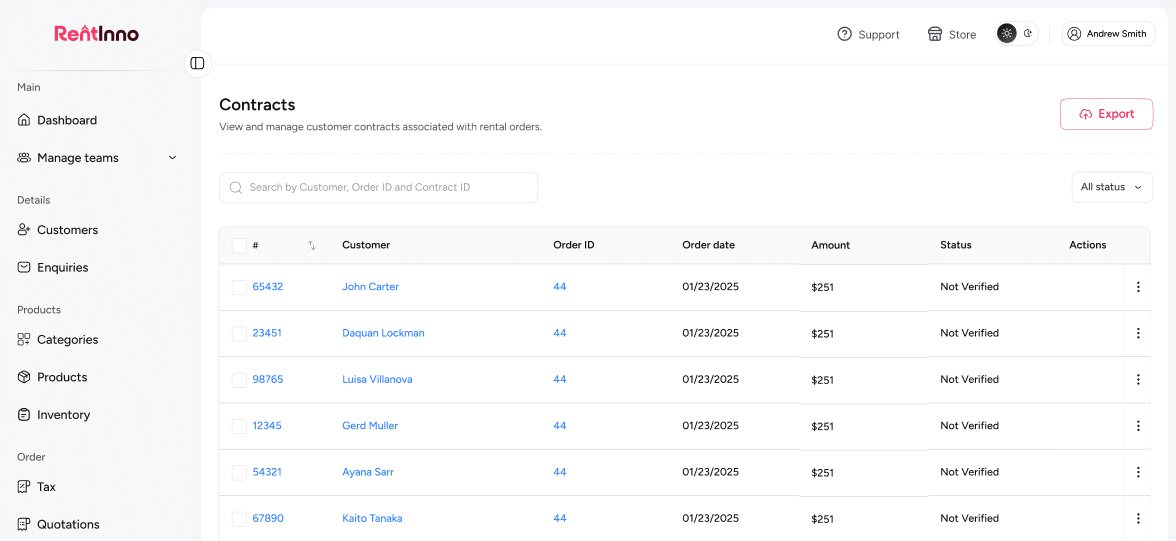
RentInno rental contracts dashboard

Every part of your rental contract workflow - handled without the manual work

Every contract generated from the order automatically

When an order is created in RentInno, a contract is generated with it. The customer details, owner details, product details, pickup and return dates, Subtotal, Security deposit, and Grand total are all pulled from the order - no manual drafting, no copy-pasting.

Every contract generated from the order automatically

Send and download contracts from one place

Every contract can be sent directly to your customer by email or downloaded as a PDF - from the same contract page. No switching between tools. No attaching files manually.

Send and download contracts from one place

Your signature on every contract

Upload your owner's signature once in Settings, and it appears on every contract automatically. Your business name, email, phone, and address appear on the From section of every contract without any manual entry.

Your signature on every contract

Track every contract status in one place

Every contract carries a status - Verified or Not verified. You always know which customers have signed and returned their agreement and which ones still need follow-up - without making a single call.

Track every contract status in one place

Find any contract instantly

Search by Customer name, Order ID, or Contract ID to find any contract in seconds. Filter by status to see only verified contracts or only contracts still waiting on a signature.

Find any contract instantly

Your contract is sent - here is what happens next

Orders

Every contract is tied to an order. Manage the full rental - products, dates, payment status, and contract status, all from the order page.

See how Orders work
Invoice and Payments

Collect full or partial payment directly from the order. Cash, card, bank transfer, or Stripe - all supported inside RentInno.

Quotations

Every order starts with an accepted quotation. Build and send a professional quote - it converts to an order and a contract with one click.

Orders

Ready to stop chasing signed contracts?

Generate a contract from your order, send it directly to your customer, and track the status until it is verified - free to start, no installation, no credit card needed.

Frequently asked questions 

What is a rental contract in RentInno?
A rental contract is a formal agreement generated from every order. It includes the owner's details, the customer's details, product details, pickup and return dates, and the full price breakdown.
Yes. When an order is created in RentInno, a contract is generated with it. All the order details carry over to the contract automatically - no manual drafting needed.
Every contract shows the owner's name, business name, email, phone, and address in the From section. The customer name, email, and phone appear in the To section. Product details, pickup and return dates, subtotal, Security deposit, and Grand total are also included.
Yes. RentInno includes a Terms and Conditions panel on every contract. Add your rental terms once, and they appear on every contract automatically.
How do I send a contract to my customer?
Open the contract from the Contracts section or from the order page and click Send contract. The contract is sent directly to your customer by email without leaving RentInno.
Yes. Click Download contract on any contract page to download it as a PDF. Use it to share offline or keep a physical copy for your records.
The contract includes a Renter Signature section. Your customer signs and returns the contract. You upload the signed version as the Customer signed contract from the order page.
Upload your owner's signature once in Settings under Logo and Icons. It appears automatically on every contract generated from your account - no manual addition needed.
What contract statuses does RentInno support?
Every contract carries one of two statuses - Verified or Not verified. The status updates as you review and verify the signed contract returned by your customer.
Not verified means the contract has been sent, but the signed version has not yet been uploaded or confirmed. It is still waiting on the customer's signature.
Verified means the signed contract has been received and confirmed. The rental is cleared to proceed with a verified agreement in place.
Upload the signed contract from the order page under Customer signed contract. Once uploaded and reviewed, update the Contract status to Verified from the order page.
How do I find a specific contract?
Search by Customer name, Order ID, or Contract ID from the Contracts list page. You can also filter by status to see only verified or not verified contracts.
Yes. Click Export on the Contracts list page to download your full contracts list as a CSV file.
Yes. Open any contract and click View order to go directly to the order that generated the contract.
All contracts are listed under the Contracts section in the Order menu. Every contract is linked to its order and accessible from both the Contracts list and the order detail page.
Contact us through whatsapp