
Contact sales

Our software caters to all the verticles of equipment rental businesses. Have other plans? Share yours.

Chat with us

Contact sales

Our software caters to all the verticles of equipment rental businesses. Have other plans? Share yours.

Chat with us
RentInnoLogo
Inventory Tracking

Real-time inventory tracking for rental business

Never guess which unit is available again. Each rental unit is tracked individually from In Stock to Returned - always accurate, always up to date.

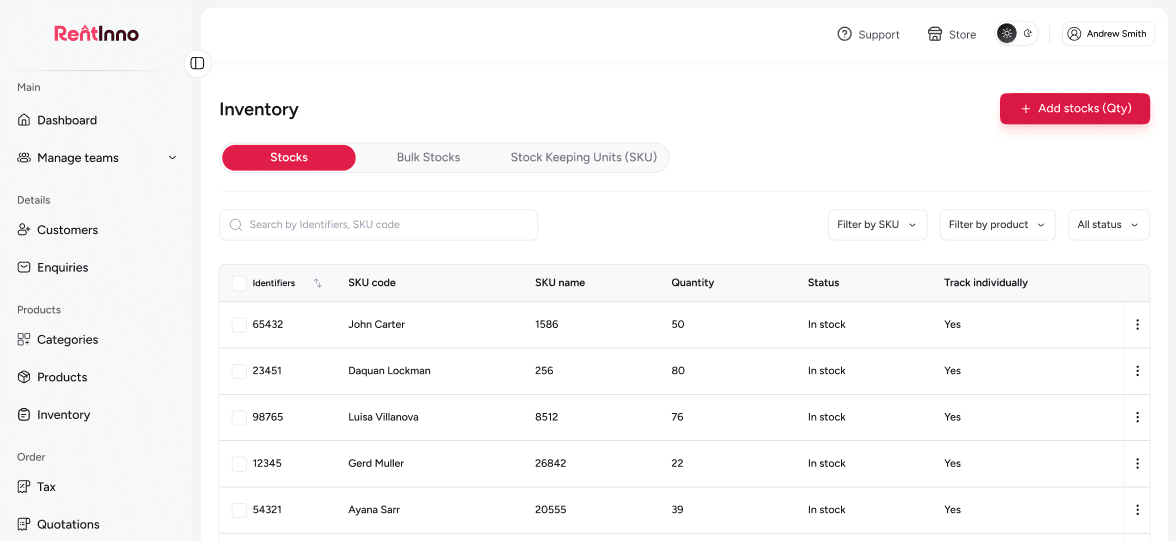
RentInno inventory tracking dashboard

Every part of your rental inventory - tracked without the manual work

Track every unit individually by SKU

Without individual tracking, you are guessing which unit is out and calling your team to find out. With SKU tracking, every unit has its own code and status - you see exactly what is happening to each one without picking up the phone.

Track every unit individually by SKU

Manage bulk stock without tracking every unit

Not every item needs its own serial number. For products managed as a pool - balloons, sandbags, hand tools - bulk tracking lets you set a total count and update numbers by status in one action. No individual SKUs. No extra setup.

Manage bulk stock without tracking every unit

Always know where every unit stands

A unit without a status is a unit you cannot account for. Every item in RentInno carries a clear status - In Stock, Reserved, Rented, Returned, or Damaged - so you always know exactly where everything stands without making a single call.

Always know where every unit stands

Search and filter your entire inventory instantly

When a customer asks if something is available right now, you should not have to scroll through a full list to find out. Search by SKU or filter by status, and the answer is in front of you in seconds.

Search and filter your entire inventory instantly

Inventory that updates itself

Every time an order is confirmed, your inventory updates on its own. No switching tabs. No updating a spreadsheet. No calling someone to mark a unit as rented. It happens automatically through Connect to Inventory.

Inventory that updates itself

Your inventory is ready - here is what happens next

Product catalog

Every inventory unit connects to a product. Set up your catalog first, and inventory tracks automatically with every booking.

See how the Product catalog works
Quotation

Build and send professional quotes in minutes. Inventory availability updates the moment a quote is accepted.

Orders

Process rentals from confirmation to return. Every order updates the inventory status of the units involved.

Product catalog

Ready to take control of your rental inventory?

Set up your inventory, assign SKU codes, and know exactly what is available at any time - free to start, no installation, no credit card needed.

Frequently asked questions 

What is inventory tracking in RentInno?
If you have ever lost track of which item is out, which is available, or which came back damaged, inventory tracking solves that. Every unit gets a code and a status. You always know where everything is.
A SKU is a unique code that identifies each rental unit - like a serial number on the back of a phone. BU-1 and BU-2 might look identical, but RentInno knows which is which. That is how you track them separately.
Individual tracking is for high-value items where you need to know exactly which physical unit is where - think crane BU-1 or generator PG-3. Bulk tracking is for items where the total number matters more than which specific unit. You set the preference once per product.
No. Inventory tracking applies to physical products only. Service products do not require inventory tracking since no physical stock is involved.
How do I connect a product to inventory?
Every product has a Connect to Inventory section. Set it up once, and your inventory stays in sync with every order automatically, no manual updates needed after that.
Yes. You can enter a custom SKU code or use the default SKU that RentInno generates automatically for each product.
Yes. Update the tracking preference on the product page at any time. Changes apply to future inventory updates.
Go to the Inventory section, find the product, and use the Add stocks button to add new units.
What stock statuses are available in RentInno?
RentInno supports ten statuses - In Stock, Reserved, Rented, Maintenance, Overdue, Damaged, Lost, Returned, Archived, and Inspection. Update the status of any unit directly from the inventory page.
Find the unit by SKU code or identifier in the Inventory section and update its status from the dropdown. Bulk tracked units are updated per status in a single pop-up.
Search by SKU code or identifier to find any unit instantly. Filter by status to see all units matching In Stock, Rented, Damaged, or any other status.
The moment an order is confirmed, the unit status updates on its own. You do not have to do anything - your inventory stays accurate without a single manual entry.
How do I update inventory when a rental is returned?
When processing the return on an order, update the status of each unit to Returned, Damaged, or Lost. Bulk tracked units are updated per status in a single pop-up.
The unit status updates to Damaged, and the security deposit is claimed. You do not have to chase the customer or manually update a spreadsheet. RentInno handles it.
The security deposit is claimed, and the unit status updates to Lost. The unit is removed from available stock until manually resolved.
Yes. If one unit comes back damaged and another is still out on rent, you know exactly which one was affected and which is still active. Bulk tracked units show a count change only - so individual tracking is worth it for high-value equipment.
Contact us through whatsapp