
Contact sales

Our software caters to all the verticles of equipment rental businesses. Have other plans? Share yours.

Chat with us

Contact sales

Our software caters to all the verticles of equipment rental businesses. Have other plans? Share yours.

Chat with us
RentInnoLogo
Invoice and Payment

Invoice and payment management for rental business

Stop chasing payments over phone calls and messages. Every invoice generated, every payment recorded, and every outstanding balance tracked - all from the same place as your orders.

RentInno invoice and payment dashboard

Every part of your invoice and payment workflow is handled without manual work

Every invoice is generated automatically from the order

When an order is created in RentInno, an invoice is generated with it. The customer details, product details, subtotal, Security deposit, and Grand total are all pulled from the order automatically. No manual invoicing. No copy-pasting numbers between tools.

Every invoice is generated automatically from the order

Collect payment in any way your customer prefers

Not every customer pays the same way. From the Update payment modal, choose Cash, Bank, Card, Stripe link, or Other as the payment method. Record the payment date, enter the amount, and add optional notes - all from the order page without leaving RentInno.

Collect payment in any way your customer prefers

Accept full or partial payments on any order

Some customers pay upfront. Others pay in stages. RentInno supports both. Record a partial payment, and the Outstanding balance updates automatically. Your customer can pay the remainder later - the balance is always visible on the order.

Accept full or partial payments on any order

Track rental amount and security deposit payments separately

When collecting payment, choose whether the amount goes toward the Rental amount or the Security deposit - tracked separately so you always know what has been paid toward each. No confusion. No mixed records.

Track rental amount and security deposit payments separately

Find any invoice instantly

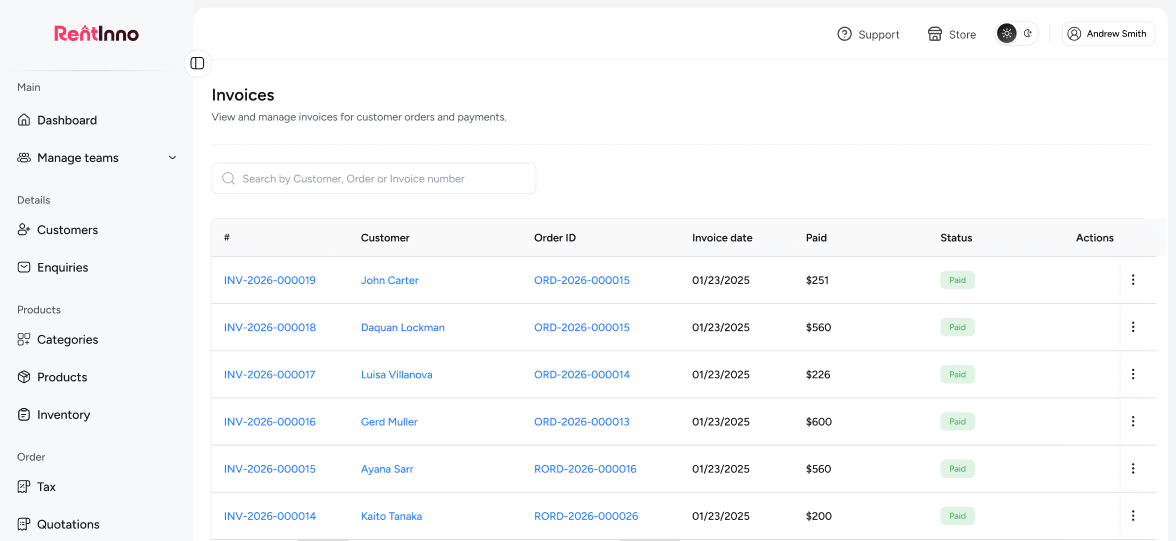
When a customer asks about their invoice, you should have the answer in seconds. Search by Customer name, Order ID, or Invoice ID from the Invoices list page. See the Total amount and how much has been paid at a glance without opening each invoice.

Find any invoice instantly

Your payment is recorded - here is what connects next

Orders

Every invoice and payment is tied to an order. View the full rental - products, dates, contract status, and payment history, all from the order page.

See how Orders work
Rental Contracts

Every order comes with a contract. Send it to your customer, collect the signed PDF, and verify it before the rental begins.

Security Deposits

Track rental amount and security deposit payments separately. Know exactly what has been paid and what is still outstanding on every order.

Orders

Ready to get paid without the follow-up calls?

Generate invoices, record payments, and track outstanding balances - all from your RentInno dashboard. Free to start, no installation, no credit card needed.

Frequently asked questions 

What is an invoice in RentInno?
An invoice is generated automatically from every order. It includes the customer details, products, subtotal, Security deposit, and Grand total - ready to share without any manual drafting.
Go to the Orders section and click Invoices. Every invoice is listed with the Invoice ID, Customer name, Order ID, Order date, Total amount, and Paid amount.
Yes. Search by Customer name, Order ID, or Invoice ID from the Invoices list page to find any invoice instantly.
Yes. Click Export on the Invoices page to download your full invoice list.
How do I record a payment on an order?
Open the order detail page and click Update payment. Enter the payment date, select the payment method, choose what the payment goes toward, enter the amount, and click Update.
RentInno supports Cash, Bank, Card, Stripe link, and Other. Select the payment method from the dropdown in the Update payment modal.
Yes. Enter the partial amount in the Update payment modal. The Subtotal paid, Security deposit paid, Total paid amount, and Outstanding balance all update automatically.
Yes. The Update payment modal includes an optional Notes field where you can record any payment-related details for your own reference.
How does RentInno track what has been paid?
Every order shows Subtotal paid, Security deposit paid, Total paid amount, and Outstanding separately. The amounts update in real time as payments are recorded from the order page.
Yes. When recording a payment, use the Pay toward option to specify whether the payment goes toward the Rental amount or the Security deposit. Both are tracked independently.
The Outstanding balance is the difference between the Grand total and the Total paid amount. It updates automatically every time a payment is recorded and shows you exactly how much is still owed.
Open the order detail page and click the viewOrderPaymentsTab. Every payment recorded for that order is listed with the date, method, amount, and notes.
Does RentInno support online payments?
Yes. RentInno supports Stripe link as a payment method. Select the Stripe link when recording a payment to process it online directly from the Update payment modal.
Go to Advanced Settings and click Stripe keys. Enter your Stripe secret key and publishable key to connect your Stripe account to RentInno.
Stripe link is available as a payment method on orders. Connect your Stripe account from Advanced Settings to enable online payment collection.
Stripe is optional. RentInno also supports Cash, Bank transfer, Card, and Other as payment methods - all recordable from the Update payment modal without any third-party integration.
Contact us through whatsapp