
Contact sales

Our software caters to all the verticles of equipment rental businesses. Have other plans? Share yours.

Chat with us

Contact sales

Our software caters to all the verticles of equipment rental businesses. Have other plans? Share yours.

Chat with us
RentInnoLogo
Orders

Order management for rental business

Every rental order - from the first product added to the final payment collected- is managed without the back and forth.

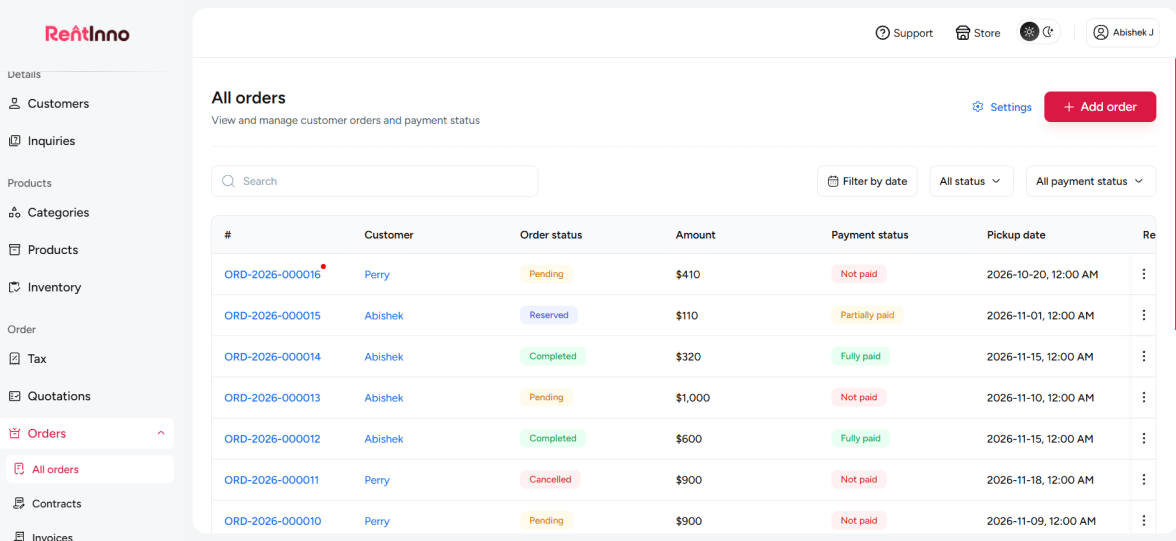
RentInno order management dashboard

Every part of your order workflow is handled without manual work

Every order detail in one place

Most rental businesses track orders across WhatsApp messages, handwritten notes, and spreadsheets. With RentInno, every order has its own page - customer details, pickup and return dates, products, payment status, contract status, and outstanding balance all visible in one place.

Every order detail in one place

Create an order in minutes

Add a customer, set the Pickup / Return date and time, add products, apply fees or a security deposit, and your order is ready. The Subtotal, Grand total, Paid, and Outstanding amounts calculate automatically as you build them.

Create an order in minutes

Always know what is confirmed, paid, and signed

An order without clear status tracking means constant follow-up calls. Every order in RentInno carries an Order status, Payment status, and Contract status - updated in real time so you always know what is confirmed, what is paid, and what still needs attention.

Always know what is confirmed, paid, and signed

Contracts, invoices, and payments from the same order page

You should not have to switch between tools to send a contract, generate an invoice, and collect payment. Every order in RentInno has a Documents panel - send the contract by email, track the signed PDF, view the invoice, and collect payment without leaving the order.

Contracts, invoices, and payments from the same order page

Search, filter, and find any order instantly

When a customer calls asking about their order, you should have the answer in seconds. Search by customer name, filter by Order status or Payment status, and use the Pickup / Return date range to find exactly what you are looking for.

Search, filter, and find any order instantly

Your order is confirmed - here is what happens next

Quotations

Every order starts with an accepted quotation. Build and send a professional quote to your customer - it converts to an order with one click.

See how Quotations work
Rental Contracts

Every order comes with a contract. Send it to your customer, collect the signed PDF, and verify it before the rental begins.

Invoice and Payments

Collect full or partial payment directly from the order. Cash, card, bank transfer, or Stripe - all supported inside RentInno.

Quotations

Ready to manage your rental orders without the chaos?

Create your first order, send the contract, and collect payment - all from one place. Free to start, no installation, no credit card needed.

Frequently asked questions 

What is an order in RentInno?
An order is a confirmed rental booking. It holds every detail - customer, products, pickup and return dates, payment status, contract status, and outstanding balance - all in one place.
A quotation is a price proposal sent to the customer for approval. Once the customer accepts it, the quotation converts to an order with one click. The rental process begins from the order.
Go to the Orders section and click All Orders. Every order is listed with the customer name, order status, payment status, amount, pickup date, and return date.
Yes. Click Add order from the All Orders page and fill in the customer details, Pickup / Return date and time, products, and fees. The order is created immediately without needing a quotation first.
What details do I need to create an order?
Every order needs a customer, a Pickup / Return date, and at least one product. You can also add a payment due date, delivery fee, pickup fee, security deposit, discount, and notes.
RentInno calculates the Sub total automatically based on the products added and the rental duration. The Grand total includes all fees and the security deposit. Paid and Outstanding amounts update as payments are recorded.
Yes. Click Add products on the order page and select as many products as needed. Each product shows the price per day, quantity, and In stock count before you add it.
Yes. Click Edit order items from the order detail page to update products, dates, fees, or the security deposit at any time before the order is closed.
What order statuses are available in RentInno?
Every order carries one of four statuses - Pending, Reserved, Returned, or Draft. The status updates as the rental progresses from confirmation to return.
Every order carries a payment status - Not Paid, Partially Paid, or Fully Paid. The status updates as payments are recorded through the Update payment option on the order page.
Every order has a Contract status - Pending, Not verified, or Verified. It tracks whether the rental contract has been sent, signed, and confirmed before the rental begins.
Click Update payment on the order detail page. Enter the amount paid and the payment method. The Paid and Outstanding amounts update instantly.
How do I send a contract from an order?
Open the order detail page and find the Documents panel. Click Send email to send the contract directly to your customer. The contract includes all order details - products, dates, and the full price breakdown.
Yes. Click Update payment on the order page and enter the amount received. RentInno records it as a partial payment and updates the Outstanding balance automatically.
RentInno supports cash, card, bank transfer, and Stripe. Record the payment method when updating the payment from the order detail page.
Yes. Every order generates an invoice automatically. Open the order detail page, find the Documents panel, and click the invoice link to view or download it.
Contact us through whatsapp